
The last two weeks brought more to Sentio OS than any release cycle before. Most of it serves one goal: a humanoid that feels natural in front of people, and that the people running it can trust. Here is what is new on the Unitree G1 EDU, from version 0.8.13 to 0.8.26.
Build a Flow by conversation
The Flow editor now has an AI assistant built in. You write what the robot should do, then refine it in plain words: "wave after the greeting", "repeat it five times". Every change is highlighted on the canvas, and one click keeps it or reverts it.
The assistant changes only what you ask for and never invents something the robot cannot do. Instead, it tells you what is not possible and where it could be added. The conversation is saved together with the Flow, so you can see later how it came about.
The robot gestures as it speaks
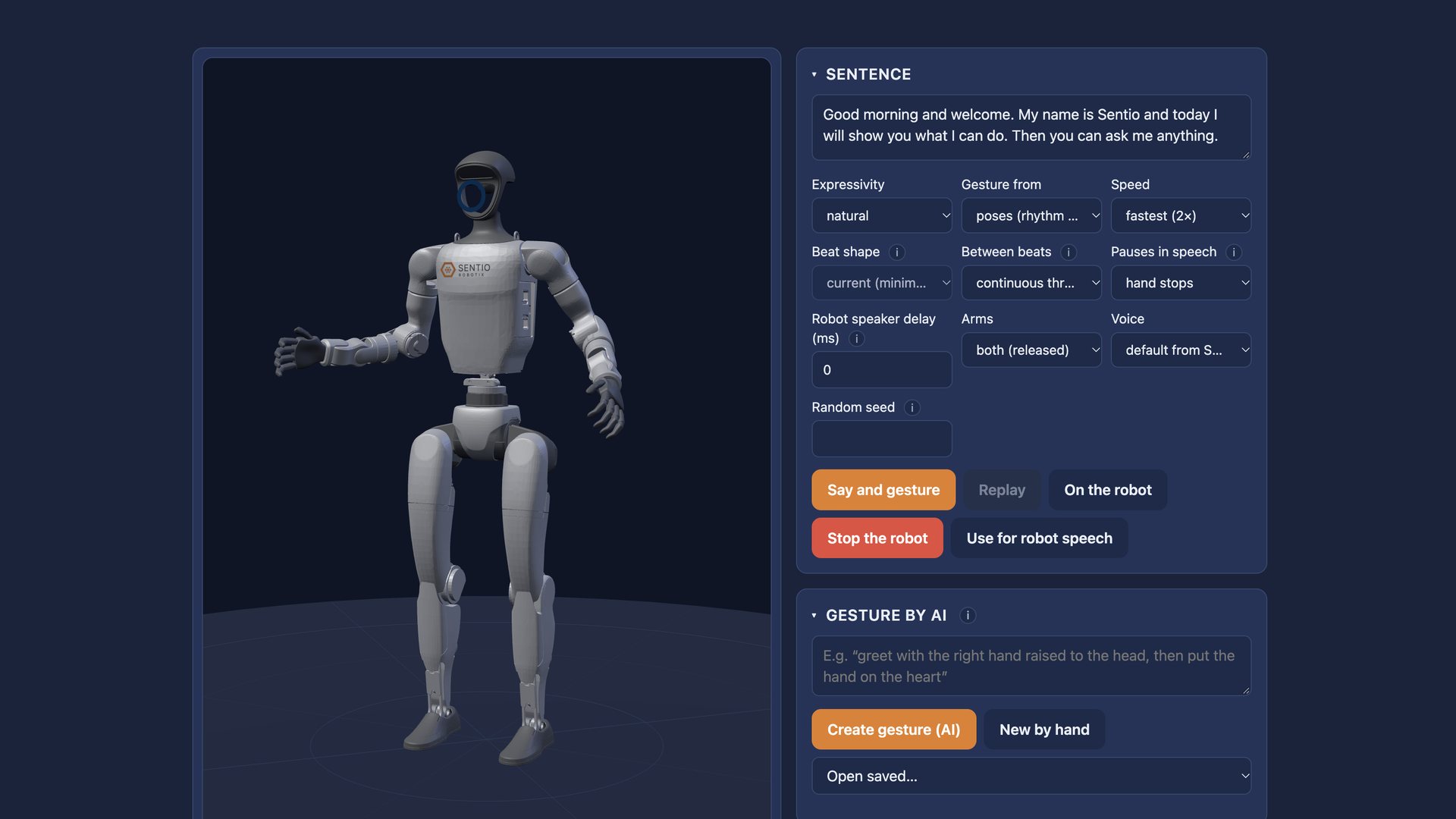
Until now, gestures had to be placed by hand. Sentio OS now plans them for every sentence based on what is being said, holds the hand still on pauses and moves both arms together, one leading and the other following. The motion is quicker on the stroke and slower on the return, so it reads as human rather than mechanical. You can pick a subtle, natural or expressive style.
This works in Flows, in conversation, in panel discussions and in Keynote & Show, where lines from recorded audio now get gestures automatically.
To tune the style, there is a trainer with a 3D model: type a sentence, and the model says it and gestures exactly as the real robot would. One button carries the style over to the robot. The same 3D figure now shows the robot live on the Home and Monitoring screens and in the editors, with a blue ghost showing where the arm is about to go.
Alive: the robot looks alive even when idle
A humanoid that stands perfectly still looks switched off. With Alive, the robot breathes, its arms drift slightly, its waist turns and its LED pulses. As soon as it speaks, Alive steps aside.
New gestures, in words
Describe a gesture in words and AI creates it, ready to fine-tune in the frame editor. Built-in gestures can now be copied too: the robot plays one, Sentio OS saves it as your own, and you can slow it down, speed it up or mirror it.
A robot at the round table
The new Discussion mode lets the robot take part in a panel. It listens to the speakers, answers, and meanwhile gestures and lights up according to whether it is speaking or listening. Filler lines and answers are pre-recorded, so they play instantly with no awkward pauses. Speaker buttons carry the speakers' names.
Slovak, and AI that speaks your language
The robot now speaks Slovak: a new offline voice, Slovak voices from Google and Gemini, and Slovak speech recognition. It works in Flows, discussions and announcements while driving across the map. Sentio OS now covers Czech, English and Slovak.
In the English interface, AI drafts Flows and gestures in English even when you type the brief in Czech, which helps when you prepare content for international customers and partners. The whole interface is now in English, including the values inside Flows.
Local or cloud speech, your choice
Speech recognition and voice can run entirely on the robot. Sentio OS uses NVIDIA Parakeet TDT 0.6B v3 for speech recognition and Piper for the voice, both locally and without internet. Cloud voices and recognition are there when you want them: you choose which to use. With local models, no audio or transcript leaves the robot.
Better maps
The robot gets lost less often. The map is built from a graph of positions, combines several drives and keeps refining itself as the robot moves. Walls and glass can be drawn into the map, so a glass wall no longer confuses the robot.
Safer arm motion
Motion close to people has to be predictable, so this release adds several safeguards:
- The arm never makes a sudden jump. Speed has measured limits and STOP brakes in a controlled way.
- As soon as the robot starts walking, Sentio OS hands the arms back to the firmware for balance.
- If someone starts a gesture from the remote, Sentio OS releases the arms smoothly instead of pulling against it.
- From 85 °C, the robot releases even held positions to protect the motors.
- Stop everything now also stops automatic gestures and Alive.
- Wi-Fi can be switched from the web interface. If the new network fails, the robot returns to the original one on its own.
Try it
All of this is available in Sentio OS today. See the full list of capabilities on the Sentio OS page, or get in touch if you would like to see it on your robot.